Updating the Analysis for a Vulnerability Suppressed at the Project Level
Once a vulnerability is suppressed at the project level, a System Administrator or the project’s Security Contact or Developer Contact can update its exclusion analysis should any details change. In some cases, the updated analysis might justify that the vulnerability be unsuppressed. Since all analysis information for a suppressed vulnerability is deleted if the vulnerability is unsuppressed, the saved updates allow other users to participate in making a decision on whether to unsuppress the vulnerability before actually going through with the suppression.
The following procedure describes how to update analysis for vulnerability suppressed at the project level.
-
Click the
 icon in the upper right corner of the Code Insight web page to open the Code Insight main menu.
 -
Select DATA LIBRARY from the menu to open the Data Library page.
-
Select Suppressed Vulnerabilities tab to view the list of the currently suppressed security vulnerabilities in Code Insight.
-
Click the Project subtab to view the list of all vulnerabilities suppressed for projects at the project level.
-
Locate the vulnerability whose analysis you want to update, and click its corresponding Unsuppress button in the Action column.
noteThe Unsuppress button is enabled for only those vulnerabilities that you have permissions to unsuppress or on which to perform analysis updates. That is, you must be either a System Administrator or the Security Contact or Developer Contact for the project for which a given vulnerability was suppressed. For all other users, this button is disabled.
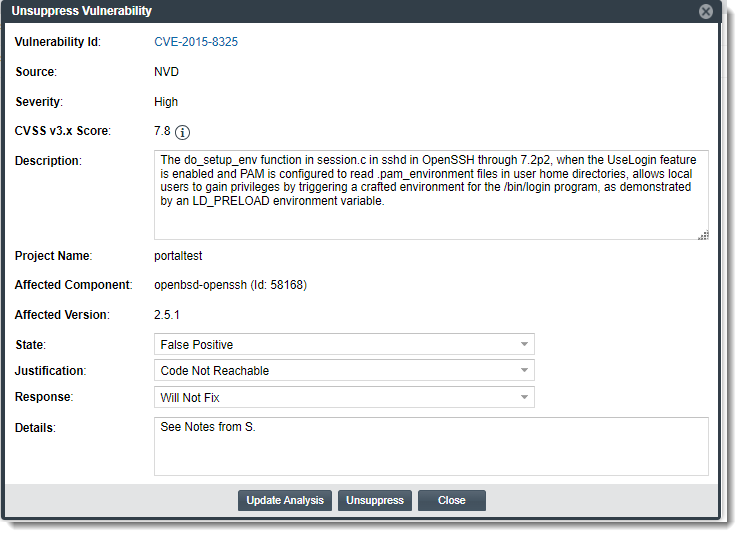
The Unsuppress Vulnerability window is displayed.
-
Update the editable fields as needed. For a description of the fields, see Unsuppress Vulnerability Window.
-
Click the Update Analysis button to save the changes and close the window. (Or click the Close button to close the window without saving the changes.)